How to use your SitnStand Classic
How to Use Your SitnStand Classic Device
Follow these step-by-step instructions to safely use your SitnStand Classic portable lift assist. Please read all sections before first use.
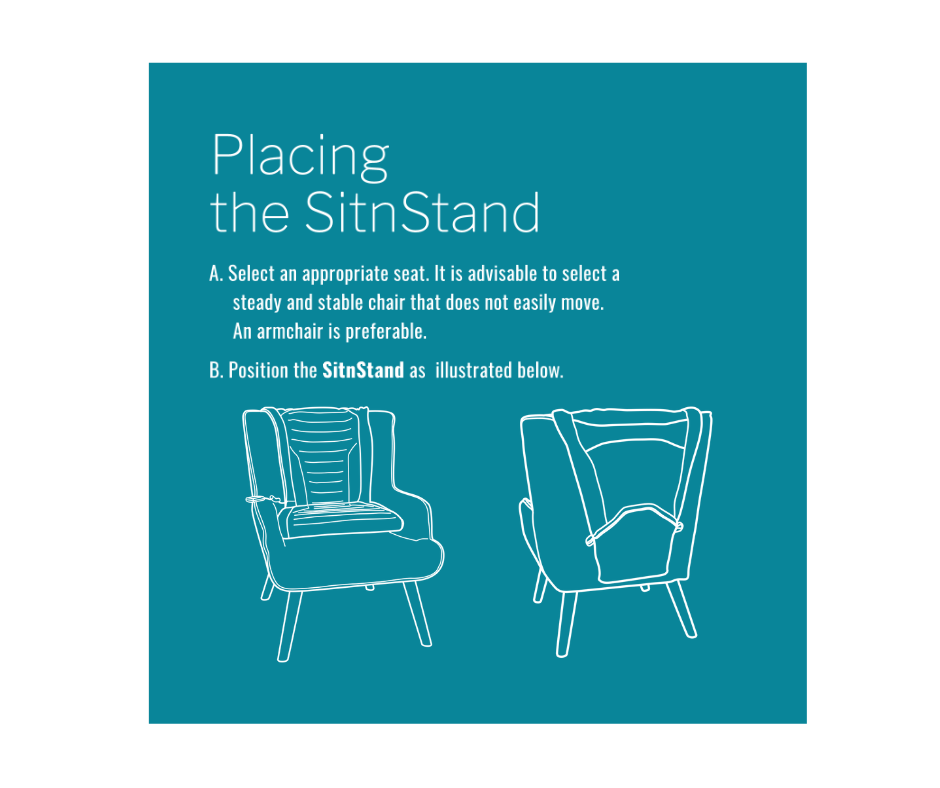
1. Placing Your SitnStand on the Chair
Choose the right chair: Select a steady, stable chair that does not easily move. An armchair is preferable. Do not use the device on rolling chairs.
- Place the SitnStand on the chair seat, centered.
- Position the device as illustrated and secure any straps.
Safety check before use:
- Ensure straps are securely fastened
- Check that the device is centered on the seat
- Maximum weight capacity: 400 lbs
- Do not use on rolling chairs
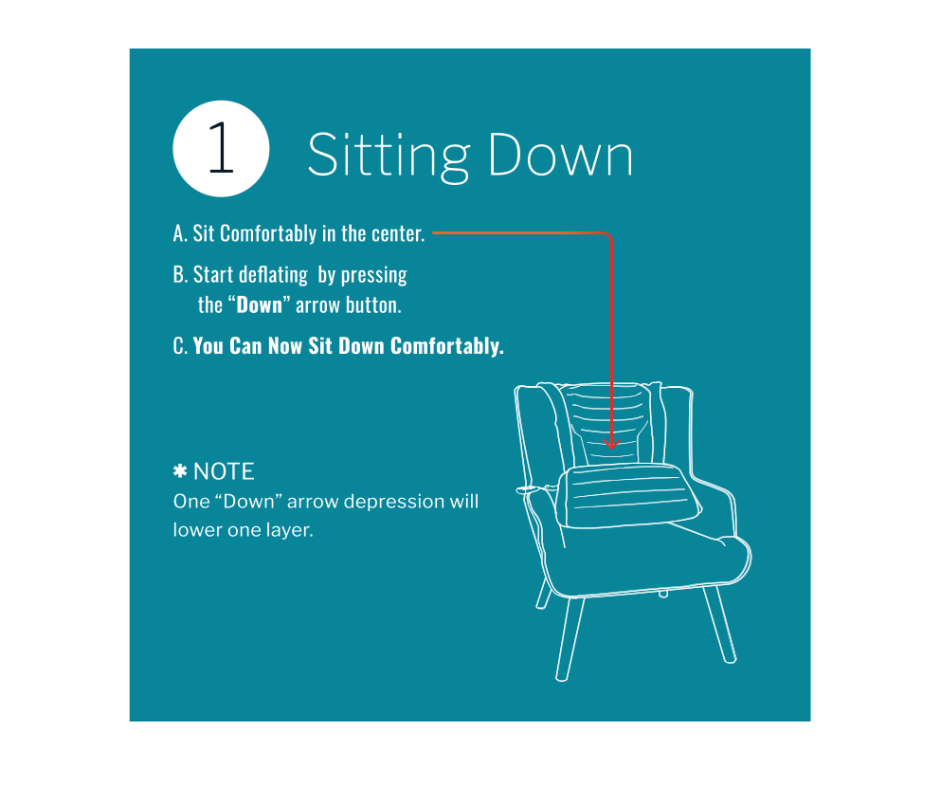
2. Sitting Down
- Sit comfortably in the center of the chair, positioned over the SitnStand device.
- Start deflating by pressing the "Down" arrow button on the remote control.
- The device will lower you gently as it deflates. You can now sit down comfortably.
Note: one press of the "Down" arrow lowers the device by one layer.
Important reminders:
- Keep the device centered on your chair
- Make sure the surface is flat and stable
- Check that the battery is charged before use
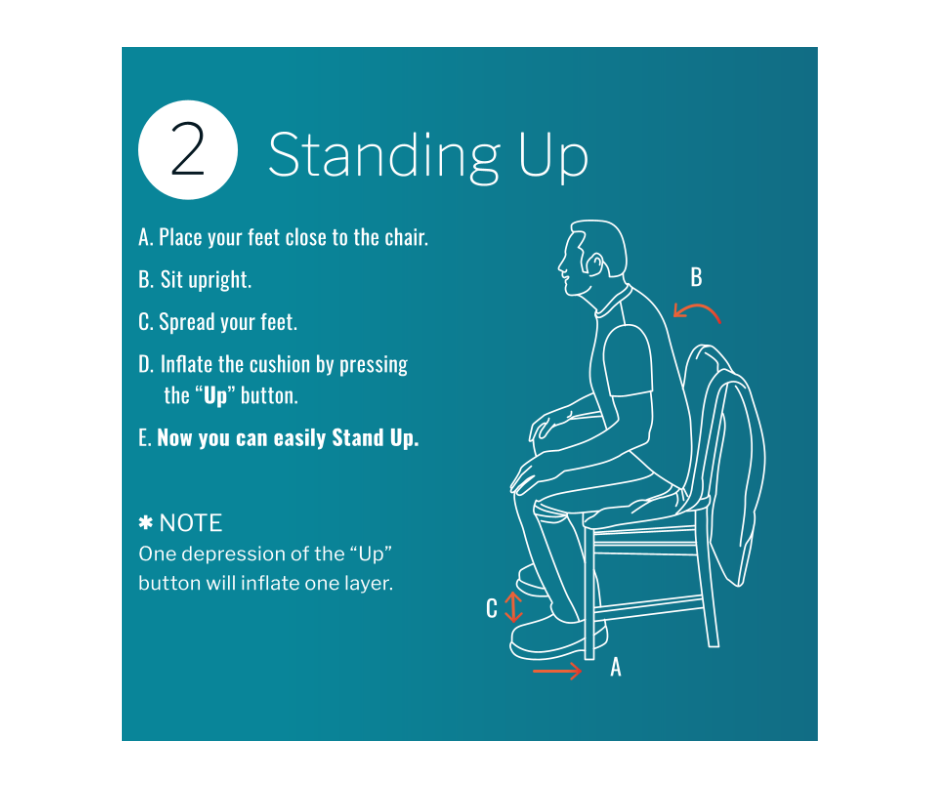
3. Standing Up
- Place your feet close to the chair.
- Sit upright.
- Spread your feet for stability.
- Inflate the cushion by pressing the "Up" button on the remote control.
- The device will gently raise you to a standing position. You can now stand up easily.
Note: one press of the "Up" button inflates the device by one layer.
Safety tips:
- Make sure the device is firmly on the chair
- Keep the remote control within easy reach
- Ensure your feet are properly positioned
- Press the "Up" button one layer at a time
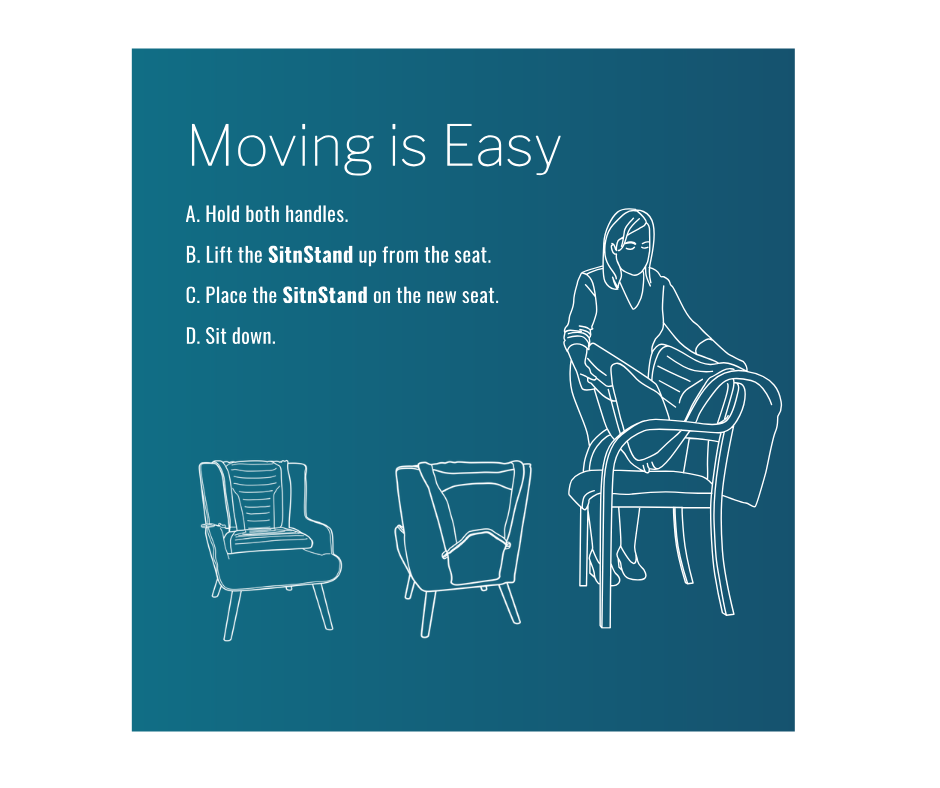
4. Moving Your SitnStand Between Chairs
The SitnStand Classic is portable and can be moved easily from one chair to another.
- Fully deflate the device using the "Down" arrow before moving.
- Hold both handles of the device.
- Lift the SitnStand up from the seat — do not drag the device.
- Carry the device flat to the new location.
- Place the SitnStand on the new seat, centered and stable.
- Sit down and continue use as usual.
Important when moving:
- Make sure each handle is secure before lifting
- Do not drag the device — always lift
- Fully deflate before moving
- Keep the device flat while carrying
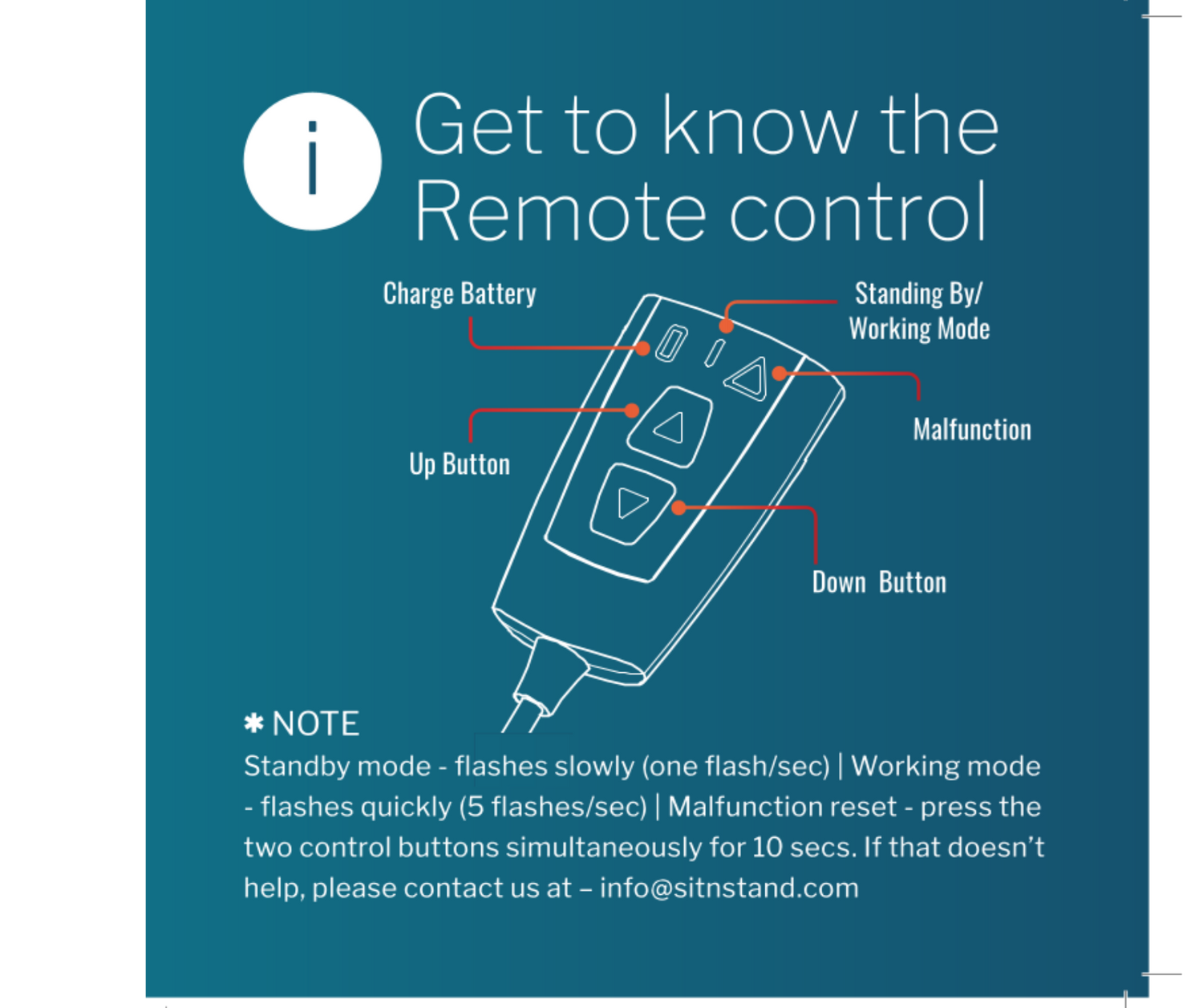
5. Know Your Remote Control
The remote control includes Up and Down buttons, a charge indicator, and operation mode indicators.
Remote control charging:
- Charging time: 2-3 hours
- Red light = charging in progress
- Green light = fully charged
- One full charge = approximately 80 lifts
Operation mode indicators:
- Standby mode: red LED flashes slowly (about one flash per second)
- Working mode: LED flashes quickly (about 5 flashes per second)
If the remote control becomes unresponsive, press both control buttons simultaneously for 10 seconds. If that does not resolve the issue, please contact us at info@sitnstand.com.
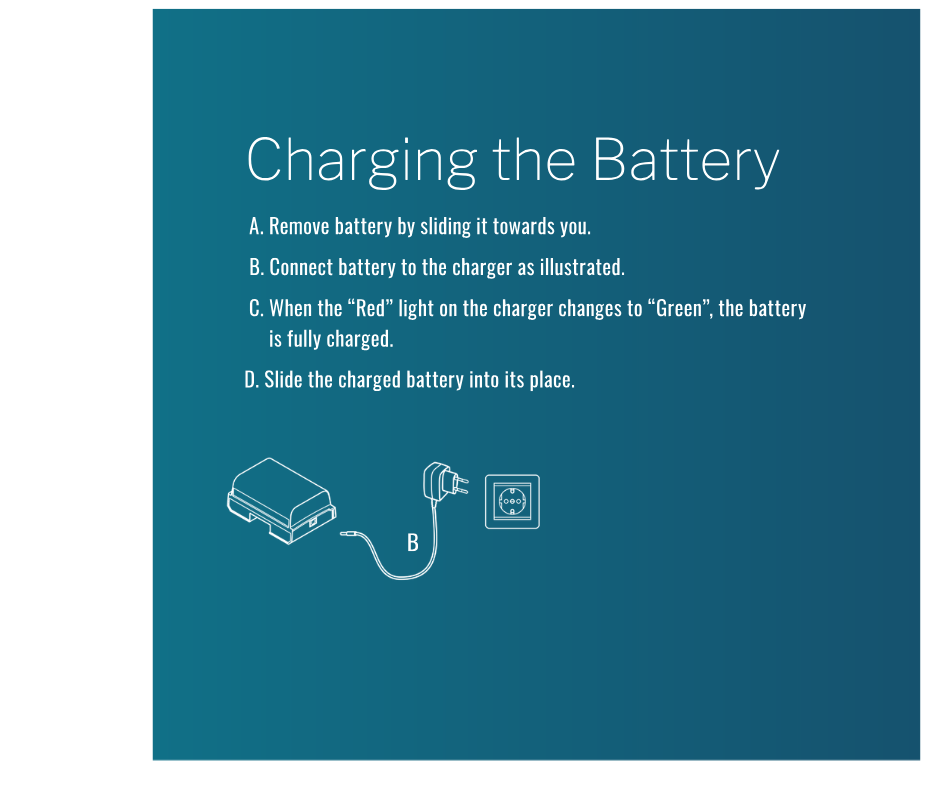
6. Charging the Battery
- Remove the battery by sliding it towards you.
- Connect the battery to the charger as illustrated.
- When the red light on the charger changes to green, the battery is fully charged.
- Slide the charged battery back into its place.
Battery information:
- Charging time: 4-5 hours
- Battery life: up to 80 lifts per charge
- Only use the original charger provided
Important:
- Keep a spare battery charged for backup
- Store the charger in a dry place
- Check the battery indicator light regularly
Safety Warnings
- Maximum weight capacity: 400 lbs. Do not exceed this weight limit.
- Do not use the device on rolling chairs, unstable chairs, or surfaces that move easily.
- Always ensure straps are securely fastened before use.
- Fully deflate the device before lifting or moving.
- Keep the device clean and dry. Do not submerge in water.
- Do not attempt to repair the device yourself. Contact customer service for assistance.
Need Help?
If you have questions about using your SitnStand Classic, please contact us:
Phone: 833-773-7360
Email: info@sitnstand.com
Business Hours: Sunday to Thursday, 8am to 5pm EST
Sitting down
Important Reminders:
- Keep the device centered on your chair
- Make sure the surface is flat and stable
- Check that the battery is charged
Standing Up
SAFETY TIPS:
- Make sure the device is firmly on the chair
- Keep the remote control within easy reach
- Ensure your feet are properly positioned
- Press the Up button one layer at a time
Charging the Battery
IMPORTANT NOTE:
Charging time: 4-5 hours
- Battery life: Up to 40 lifts per charge
- Only use the original charger provided
IMPORTANT:
- Keep spare battery charged for backup
- Store charger in dry place
- Check indicator light regularly
Placing your SitnStand
IMPORTANT NOTE:
- Ensure straps are securely fastened
- Check device is centered on the seat
- Maximum weight capacity: 400 lbs
- Do not use on rolling chairs
Moving your SitnStand
IMPORTANT NOTE:
- Make sure each handle is secure
- Do not drag the device
- Fully deflate before moving
- Keep device flat while carrying
Know your Remote Control
- Charging time: 2-3 hours
- Red light = Charging
- Green light = Fully charged
- One charge = approximately 40 lifts