<h2>How to Use Your SitnStand Wheelchair Device</h2>
<p>Follow these step-by-step instructions to safely use your SitnStand Wheelchair lift assist. Please read all sections carefully before first use.</p>
<p><strong>Critical safety: always lock the wheelchair brakes before sitting down, standing up, or placing or removing the SitnStand.</strong></p>
<p><strong>Important:</strong> for users with cognitive impairment, the SitnStand should only be operated by a caregiver.</p>
<h3>1. Placing Your SitnStand on the Wheelchair</h3>
<p><strong>Lock the wheelchair brakes before placing the SitnStand.</strong></p>
<ol>
<li>Place the SitnStand on the wheelchair seat, centered.</li>
<li>Push the air supply unit fully through the gap at the rear of the seat.</li>
<li>Place the straps of the air supply unit on the handles of the wheelchair and fasten them tightly.</li>
<li>When not in use, attach the remote control to a velcro strip on the wheelchair armrest for easy access.</li>
</ol>
<p><strong>Important checks before use:</strong></p>
<ul>
<li>Brakes are locked</li>
<li>Device is centered on the seat</li>
<li>Air unit pushed fully through the gap</li>
<li>Stable placement</li>
<li>Straps secured behind but not too tight</li>
<li>Remote control within easy reach</li>
</ul>
<h3>2. Sitting Down</h3>
<p><strong>Lock the wheelchair brakes before sitting down.</strong></p>
<ol>
<li>Sit comfortably in the center of the chair.</li>
<li>Start deflating by pressing the "Down" arrow button on the remote control.</li>
<li>The device will lower you gently. You may now sit down comfortably.</li>
</ol>
<p><em>Note: one press of the "Down" arrow deflates one chamber.</em></p>
<p><strong>Important reminders:</strong></p>
<ul>
<li>Keep the device centered on your chair</li>
<li>Make sure the surface is flat and stable</li>
<li>Check that the battery is charged before use</li>
</ul>
<h3>3. Standing Up</h3>
<p><strong>WARNING — read before standing:</strong></p>
<ul>
<li>Ensure brakes are locked</li>
<li>Feet must be firmly on the floor</li>
<li>Stay seated until fully inflated</li>
<li>Follow inflation steps in order</li>
</ul>
<ol>
<li>Take your feet off the wheelchair pedals and place them firmly on the floor, close to the chair.</li>
<li>Sit upright.</li>
<li>Spread your feet for stability.</li>
<li>Initiate the lift by pressing the "Up" button on the remote control.</li>
<li>Continue pressing the "Up" button until the cushion is fully inflated. You can now stand up easily.</li>
</ol>
<p><em>Note: one press of the "Up" button inflates one chamber.</em></p>
<h3>4. Know Your Remote Control</h3>
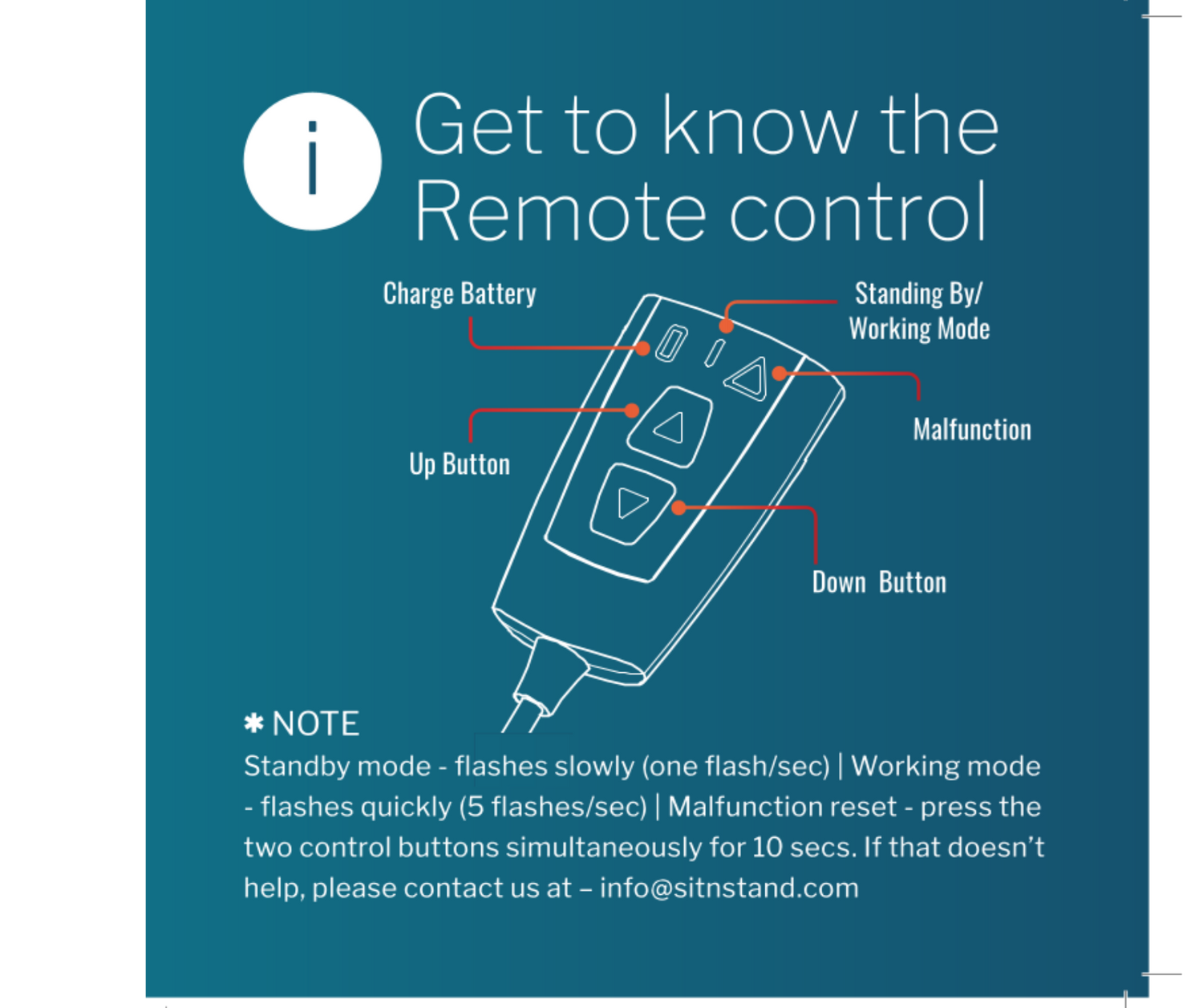
<p>The remote control includes Up and Down buttons, a charge indicator, and operation mode indicators.</p>
<p><strong>Remote control charging:</strong></p>
<ul>
<li>Charging time: 2-3 hours</li>
<li>Red light = charging in progress</li>
<li>Green light = fully charged</li>
<li>One full charge = approximately 60 lifts</li>
</ul>
<p><strong>Operation mode indicators:</strong></p>
<ul>
<li><strong>Standby mode:</strong> red LED flashes slowly (about one flash per second)</li>
<li><strong>Working mode:</strong> LED flashes quickly (about 5 flashes per second)</li>
</ul>
<p>If the remote control becomes unresponsive, press both control buttons simultaneously for 10 seconds. If that does not resolve the issue, please contact us at info@sitnstand.com.</p>
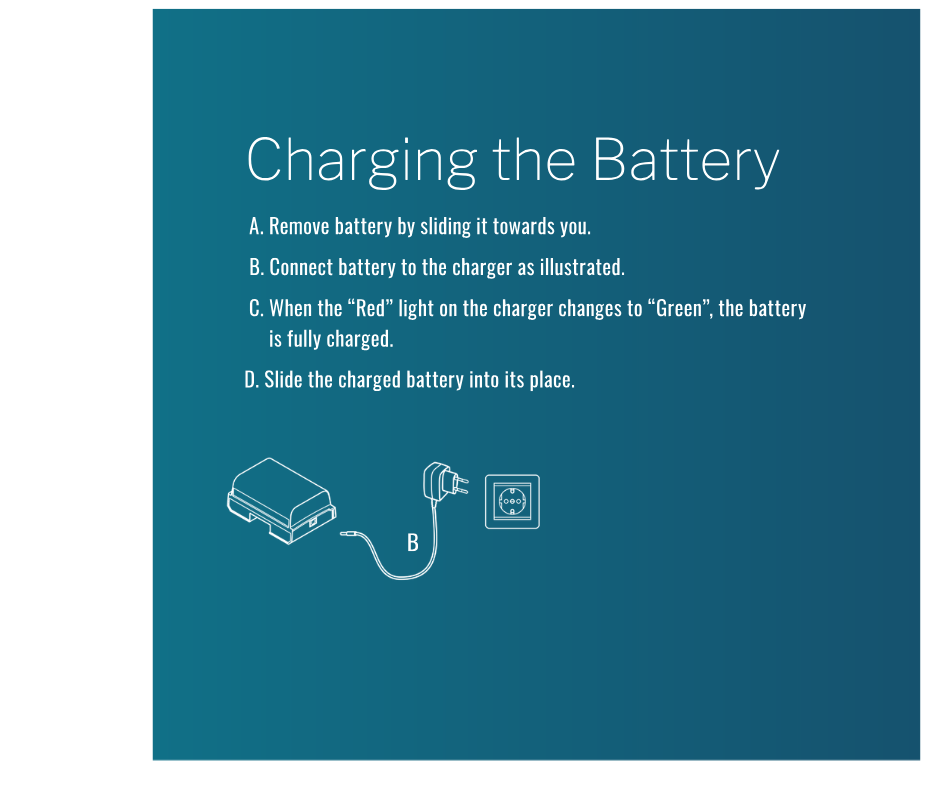
<h3>5. Charging the Battery</h3>
<ol>
<li>Remove the battery by sliding it towards you.</li>
<li>Connect the battery to the charger as illustrated.</li>
<li>When the red light on the charger changes to green, the battery is fully charged.</li>
<li>Slide the charged battery back into its place.</li>
</ol>
<p><strong>Battery information:</strong></p>
<ul>
<li>Charging time: 4-5 hours</li>
<li>Battery life: up to 40 lifts per charge</li>
<li>Only use the original charger provided</li>
</ul>
<p><strong>Important:</strong></p>
<ul>
<li>Keep a spare battery charged for backup</li>
<li>Store the charger in a dry place</li>
<li>Check the battery indicator light regularly</li>
</ul>
<h3>Safety Warnings</h3>
<ul>
<li><strong>Always lock the wheelchair brakes before sitting down, standing up, or placing or removing the SitnStand.</strong></li>
<li>Maximum weight capacity: 400 lbs.</li>
<li>For users with cognitive impairment, the SitnStand should only be operated by a caregiver.</li>
<li>Take your feet off the wheelchair footrests and place them firmly on the floor before standing.</li>
<li>Always ensure all straps are securely fastened before use.</li>
<li>Keep the device clean and dry. Do not submerge in water.</li>
<li>Do not attempt to repair the device yourself. Contact customer service for assistance.</li>
</ul>
<h3>Need Help?</h3>
<p>If you have questions about using your SitnStand Wheelchair device, please contact us:</p>
<p>Phone: 833-773-7360<br>
Email: info@sitnstand.com<br>
Business Hours: Sunday to Thursday, 8am to 5pm EST</p>
<script type="application/ld+json">
{
"@context": "https://schema.org",
"@type": "HowTo",
"name": "How to Use Your SitnStand Wheelchair Lift Assist Device",
"description": "Step-by-step instructions for safely using the SitnStand Wheelchair lift assist, including locking brakes, chair setup, sitting, standing, remote control operation, and battery charging.",
"totalTime": "PT15M",
"tool": [
{"@type": "HowToTool", "name": "SitnStand Wheelchair lift assist device"},
{"@type": "HowToTool", "name": "Remote control"},
{"@type": "HowToTool", "name": "Battery and charger"}
],
"supply": [
{"@type": "HowToSupply", "name": "Wheelchair with functional brakes"},
{"@type": "HowToSupply", "name": "Velcro strip for remote control storage (optional)"}
],
"step": [
{
"@type": "HowToStep",
"position": 1,
"name": "Placing the SitnStand on the Wheelchair",
"text": "Lock the wheelchair brakes first. Place the SitnStand on the wheelchair seat, centered. Push the air supply unit fully through the gap at the rear of the seat. Place the straps of the air supply unit on the wheelchair handles and fasten them tightly. Attach the remote control to a velcro strip on the wheelchair armrest for easy access."
},
{
"@type": "HowToStep",
"position": 2,
"name": "Sitting Down",
"text": "Lock the wheelchair brakes before sitting. Sit comfortably in the center of the chair. Press the Down arrow on the remote control to deflate the device. Each press deflates one chamber until you are seated. For users with cognitive impairment, the SitnStand should only be operated by a caregiver."
},
{
"@type": "HowToStep",
"position": 3,
"name": "Standing Up",
"text": "Ensure brakes are locked. Take your feet off the wheelchair pedals and place them firmly on the floor, close to the chair. Sit upright with feet spread for stability. Press the Up button. Each press inflates one chamber. Stay seated until the cushion is fully inflated, then stand up safely."
},
{
"@type": "HowToStep",
"position": 4,
"name": "Using the Remote Control",
"text": "The remote control has Up and Down buttons, a charge indicator, and mode indicators. Charging time is 2 to 3 hours. Red light means charging in progress; green light means fully charged. One full charge provides approximately 60 lifts."
},
{
"@type": "HowToStep",
"position": 5,
"name": "Charging the Battery",
"text": "Remove the battery by sliding it towards you. Connect the battery to the charger as illustrated. When the red light turns green, the battery is fully charged. Slide the charged battery back into place. Charging time is 4 to 5 hours; battery life is up to 40 lifts per charge. Only use the original charger provided."
}
]
}
</script>